
Tax Forms
From the Tax Forms page, you can locate the P30 and P32s, amongst other tax forms.
At the top, change the Filters for the Tax Form or Year.
Within the table, review the summarised details, or click the download icon to download the full report.
What is a P30?
A P30 is a monthly payroll summary, focusing on the total values.
In the P30, you will find critical HMRC-related payments and dues, including total taxes and NI, any Employment Allowances being claimed, as well as any Statutory Payments that have been processed during the month.
How is a P32 different?
A P32 is similar to the P30. However, it focuses on the totals to date, which helps one better understand elements like the Employment Allowance.
Therefore, the values shown in the P32 are a summary of all the payrolls from beginning of tax year until that given period.
Submitting EPS
Prior to submitting your first EPS, make sure to check out your Tax Relief settings: Enabling Employment Allowance through Buddy's EPS Submissions.
Once the Tax Reliefs settings have been enabled and set, then you can submit the EPS
- Go to Tax Forms
- Select the P30 (or P32) form and the relevant Tax Year
- If applicable, add CIS deductions
- Click Submit EPS
- This will open a window showing a summary (see below)
- Click to Submit
If you are using Buddy as a bureau, you may also be able to see the EPS status of the latest P30s of all your clients within the Advisor > Tax Forms page.
Previewing More Details
In the opened window (as per screenshot above), you can find:
- Summary tab of the current status/details
- A Preview for non-submitted EPS
- you can click view raw XML to preview the exact contents
- View the Request details
- Including the ability to review Errors
- View HMRC's Response
Advanced Statutory Funding Credit
Should the company has received an Advanced Funding for statutory payments, these can be recorded by clicking Advanced Funding Credit in the Tax Forms page.
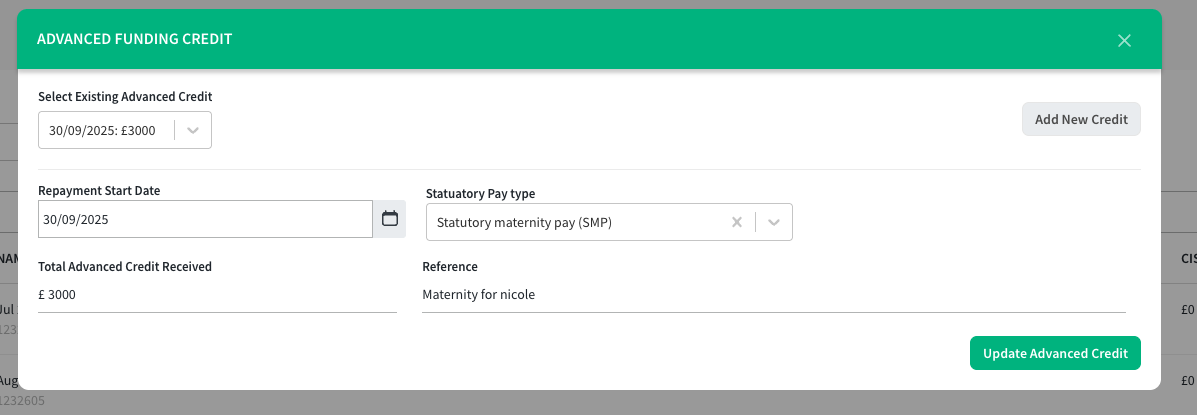
Select the details of the advanced credit and click update.
In case you need to update existing P30s to use this funding, go to Payroll History, and under Actions, Refresh Payroll Reports for the relevant payroll.
Common EPS Errors
- Authentication Failure or No Visible Error
- The supplied user credentials failed validation for the requested service
- Core details like the Gateway ID, PAYE Number or References are incorrect and did not match HMRC's details
- If you are a bureau, confirm the Agent details and Gateway ID and Password within the bureau page
-
Tax Month X cannot be only be submitted until 19 Month.
- You can only submit EPS until the 19th of the following month. If the deadline has passed, submit the next EPS which will include the totals to date.